vgm feature

Order Parts with NAPA Auto Parts Directly from VGM 

An Integrated Parts Ordering Solution with NAPA Auto Parts and VGM 

Credit-card
Link your NAPA Auto Parts account directly to VGM.
Check
Quickly order parts from jobsheets and sales invoices. 
Money
Reduce Errors: Automatic sales document creation ensures accuracy.

NAPA Logo

Order the Right Parts Within VGM

Our integration with NAPA Auto Parts is an easy-to-use way to order parts directly from VGM. Customers with a NAPA Auto Parts account can now easily link their account to VGM, browse the parts catalog, and place orders all with just a few clicks. 

motasoft imagesArtboard 23

Browse NAPA’s Parts Catalogue 

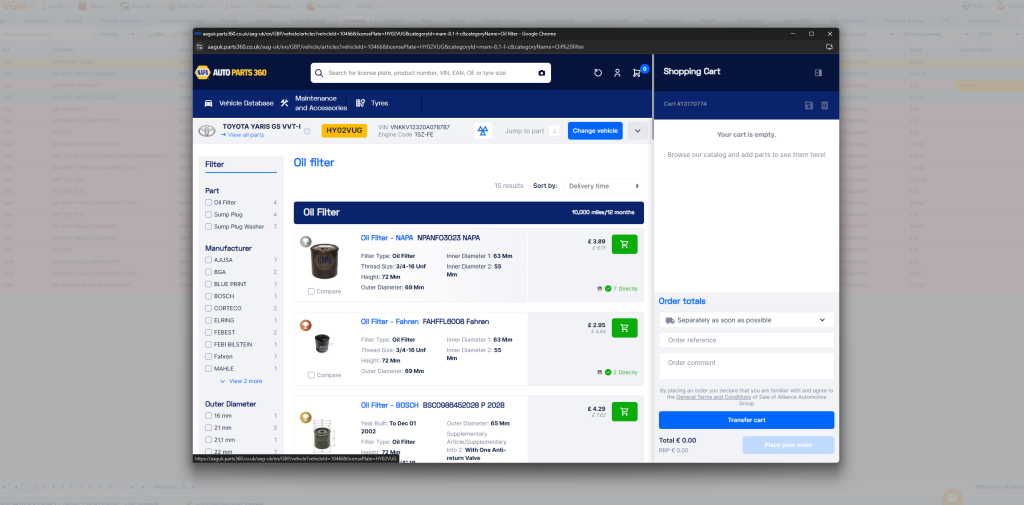
When you need parts, you can use the integrated NAPA Auto Parts catalogue inside VGM. You can easily search by part number, vehicle registration number, or part description. Finding the right parts for your customers’ vehicles has never been easier. 

Create a Basket of Parts for a Job or Invoice 

As you find the parts you need, add them to your NAPA Auto Parts basket. Build the basket as you work through a jobsheet or sales invoice. Once your basket is ready, send it back into VGM with one click.

Add the Parts and Order in VGM

VGM picks up your basket and adds the parts into the correct jobsheet or invoice. When you confirm the order, it is sent directly to NAPA Auto Parts. This keeps your workflow smooth and reduces manual steps.  

napa parts ordering

Already a VGM user?

If you’d like to integrate your existing NAPA Auto Parts account with your existing VGM account, then please contact our support team or visit the NAPA Auto Parts Integration page. 

Want a free demo of VGM?
Free demo